Customize dashboards for improved user experience
Legacy dashboard
Overview
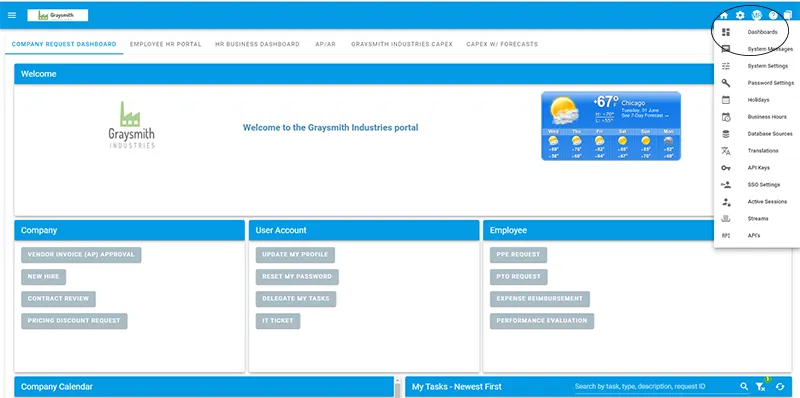
Dashboards allow administrators to define user interface screens that can be assigned to users or groups within the organization. These tabs can include Workflow Automation widgets that display unique views into information you want to make available to users.
You can define up to five dashboards for a user, including a users’ default tab that displays when they log in to Workflow Automation.
For example, you might want to display a welcome message and a series of request options on a user’s default tab:
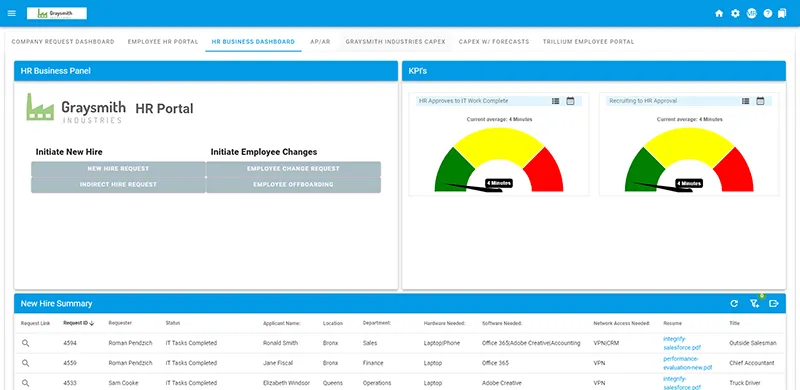
You may want to create a second dashboard for the user with access to certain metrics.
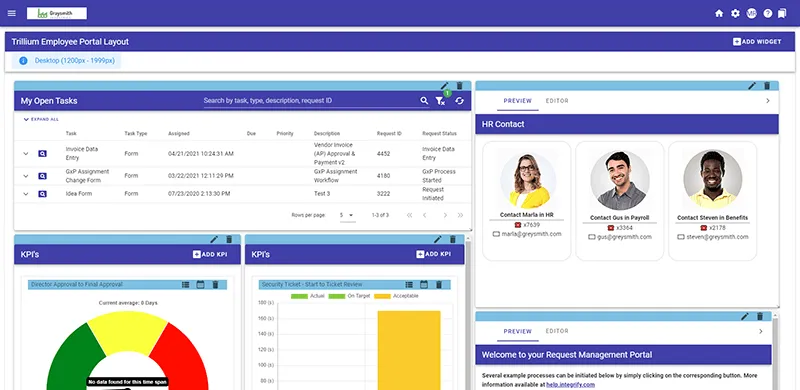
Or, you may want to create a dashboard that includes predefined filters for a user’s open approval tasks:
Guides
- Legacy dashboard interface
- Creating dashboards
- Configuring dashboards
- Adding a widget/HTML widget to your dashboard
- Adding a report to a dashboard
- Using the dashboard HTML panel widget
- Assigning and sharing dashboards
- Launch buttons